
A TelemetryDeck alternative that connects ad spend to revenue
TelemetryDeck is privacy-first analytics loved by Swift developers. OnRamp covers the same app analytics, then adds the growth side: which campaigns bring paying users, and which onboarding step loses them.
30-day free trial · No credit card · Checked against TelemetryDeck's own site in September 2026
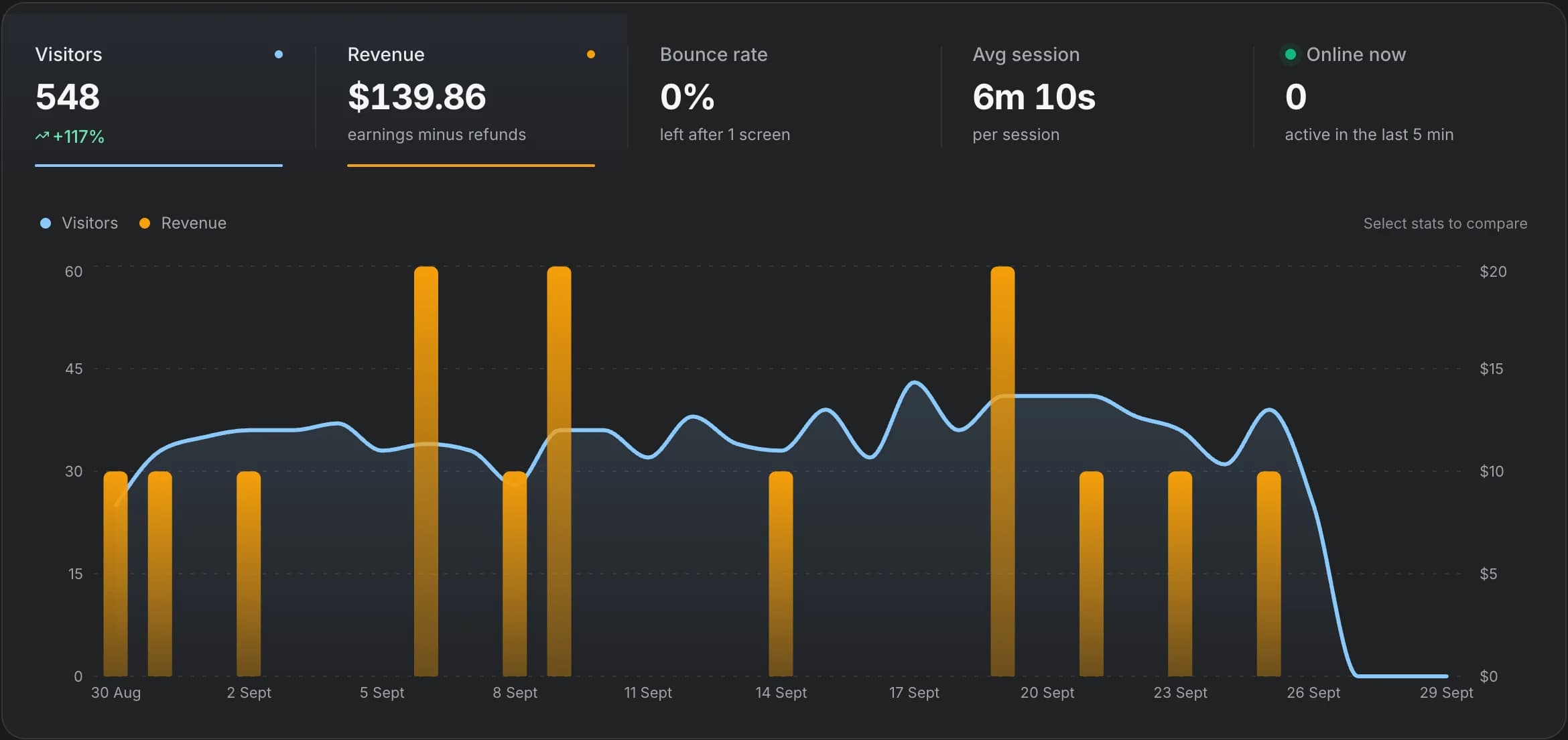
The short answer
Pick the one that fits your product
Choose OnRamp when
You spend on Apple Search Ads, Google, Meta or TikTok and want net ROAS per campaign. You want funnels that name the users who left and a per-user journey to see why.
Choose TelemetryDeck when
You build mostly for Apple platforms (including macOS and visionOS), want the strongest anonymization with hashing on the device, and a generous free tier matters.
What TelemetryDeck does well
TelemetryDeck is privacy-first app analytics built in Germany. SDKs cover iOS, macOS and visionOS, Android/Kotlin, React Native, Flutter and websites. Data is double-hashed on the device before it’s sent. It offers funnels, retention, automatic purchase tracking, a RevenueCat integration and MCP support. New accounts get 50,000 free events per month (since July 1, 2026), and paid plans scale by event volume.
OnRamp vs TelemetryDeck, side by side
TelemetryDeck comes out ahead on 3 of these, OnRamp on 4, and the rest are a tie. “Not listed” means we couldn't find it on TelemetryDeck's site when we checked in September 2026.
| Feature | OnRamp | TelemetryDeck | Edge |
|---|---|---|---|
| SDKs | iOS (Swift), Android (Kotlin), React Native, Expo, Flutter and web | iOS, macOS, visionOS, Android/Kotlin, React Native, Flutter and web | TelemetryDeck |
| Revenue | Stripe, RevenueCat, Paddle and Lemon Squeezy | Purchase tracking and RevenueCat | OnRamp |
| Ad spend and ROAS | Google Ads, Apple Search Ads, Meta Ads and TikTok Ads | Not listed | OnRamp |
| Install attribution | Apple Search Ads and Google Play install referrer (opt-in) | Not listed | OnRamp |
| Funnels | Drop-off with the users who left, step timing, version comparisons | Funnels built from filters | Both |
| Retention | Retention curve and weekly cohorts | Retention analysis | Both |
| Per-user journeys | Session timelines per user | Not listed (anonymized, aggregate by design) | OnRamp |
| Privacy model | EU (Netherlands). Raw IP addresses are not stored. Mobile uses an SDK-generated device ID | Double-hashed on the device before sending. Hosted in Germany | TelemetryDeck |
| AI agents | Agent setup prompt, CLI and MCP server | MCP support | Both |
| Price to start | From $10/mo (10k events, 1 app). Scale from $25/mo for unlimited apps and 20 members. 30-day trial, no card | Free up to 50k events/mo for new accounts. Paid plans by event volume | TelemetryDeck |
Growth
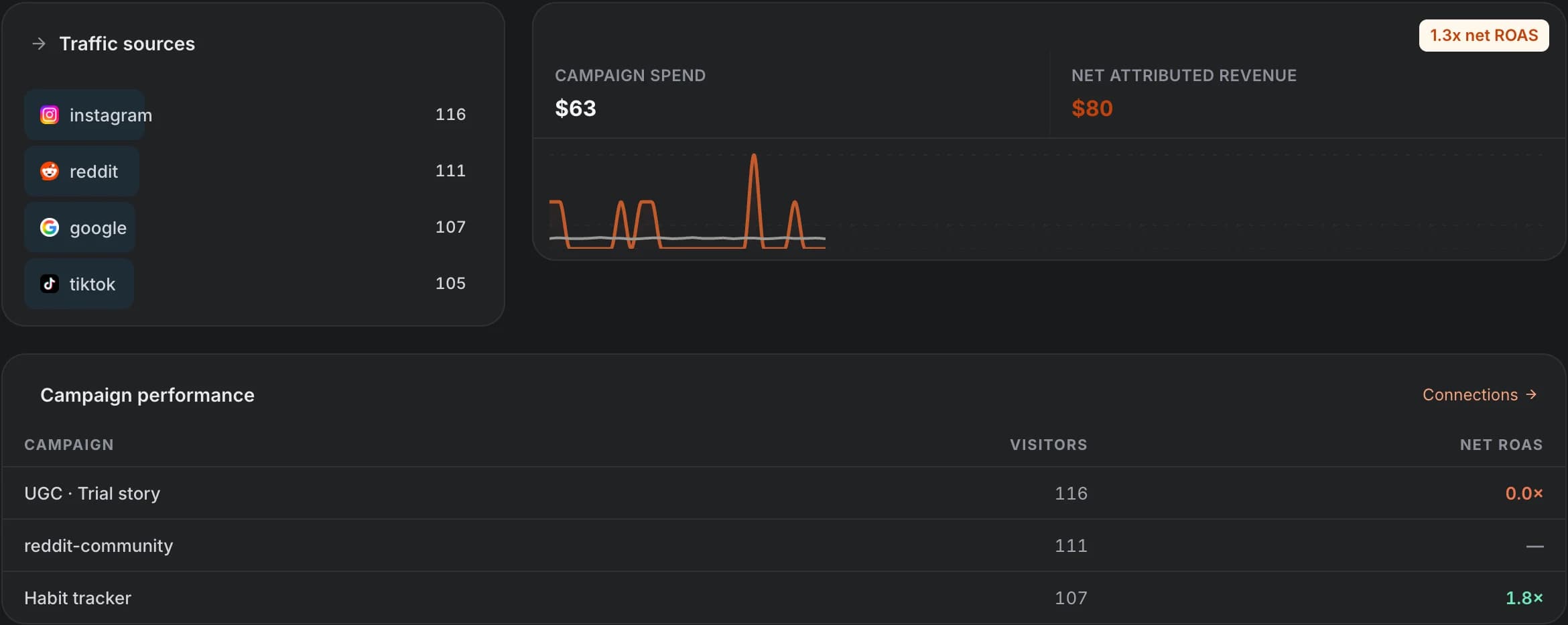
Which campaigns bring paying users?
TelemetryDeck tracks what users do in your app and can import RevenueCat purchases. We couldn’t find ad spend or install attribution in its features.
OnRamp adds the spend side. Connect Apple Search Ads, Google Ads, Meta Ads and TikTok Ads, and each campaign shows visitors, revenue and net ROAS. Apple Search Ads and Google Play install referrer attribution are built into the SDK and opt-in.
Funnels
Find the step that loses users, then fix it
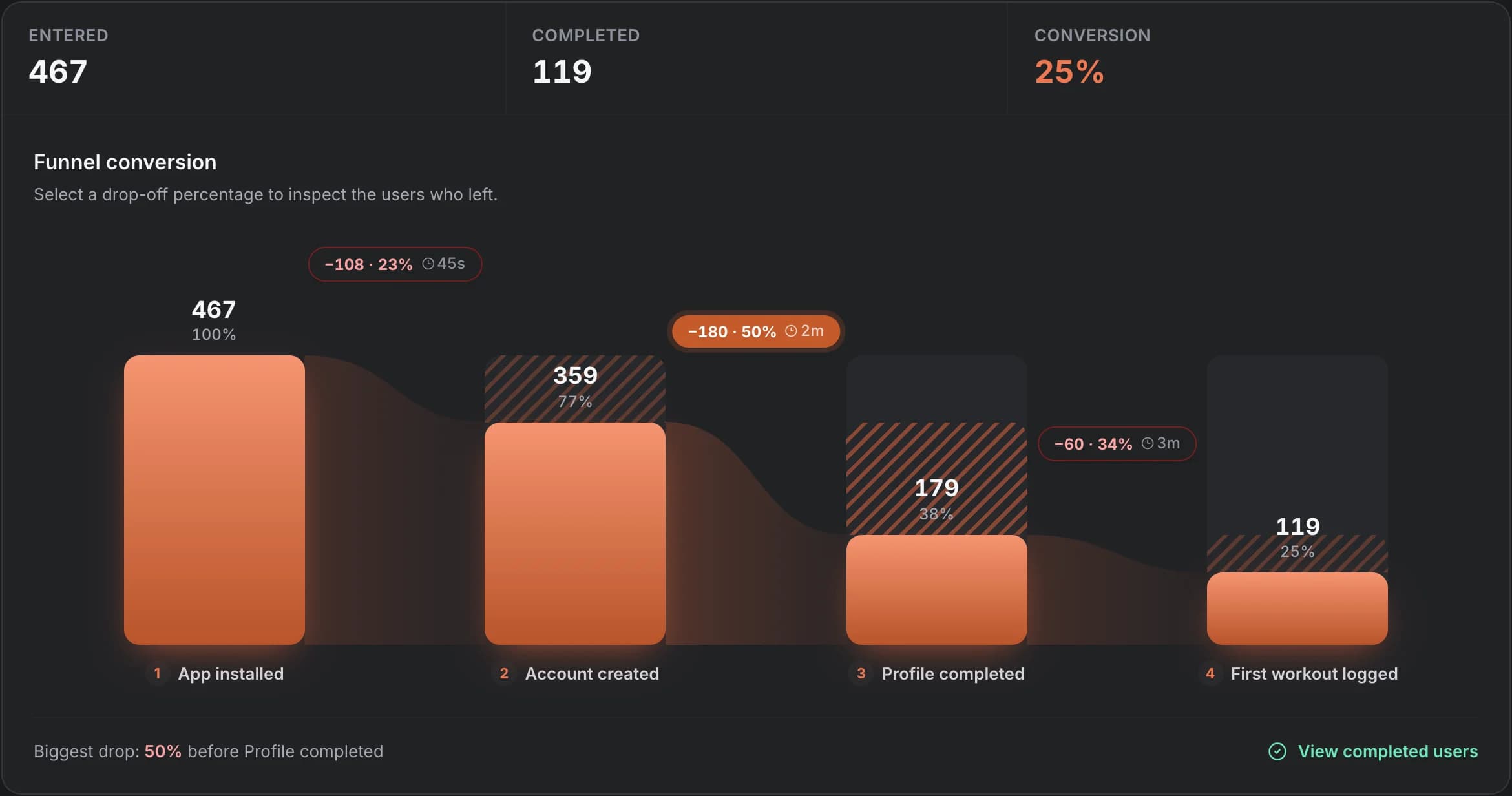
Both tools have funnels. OnRamp’s funnel shows the users lost at each step and the median time between steps. Click the biggest drop to open the list of people who left.
Split the funnel by OS or app version to rule out a device bug, then compare the next version’s cohort to see if the fix worked.
User journeys
Per-user timelines when you need them
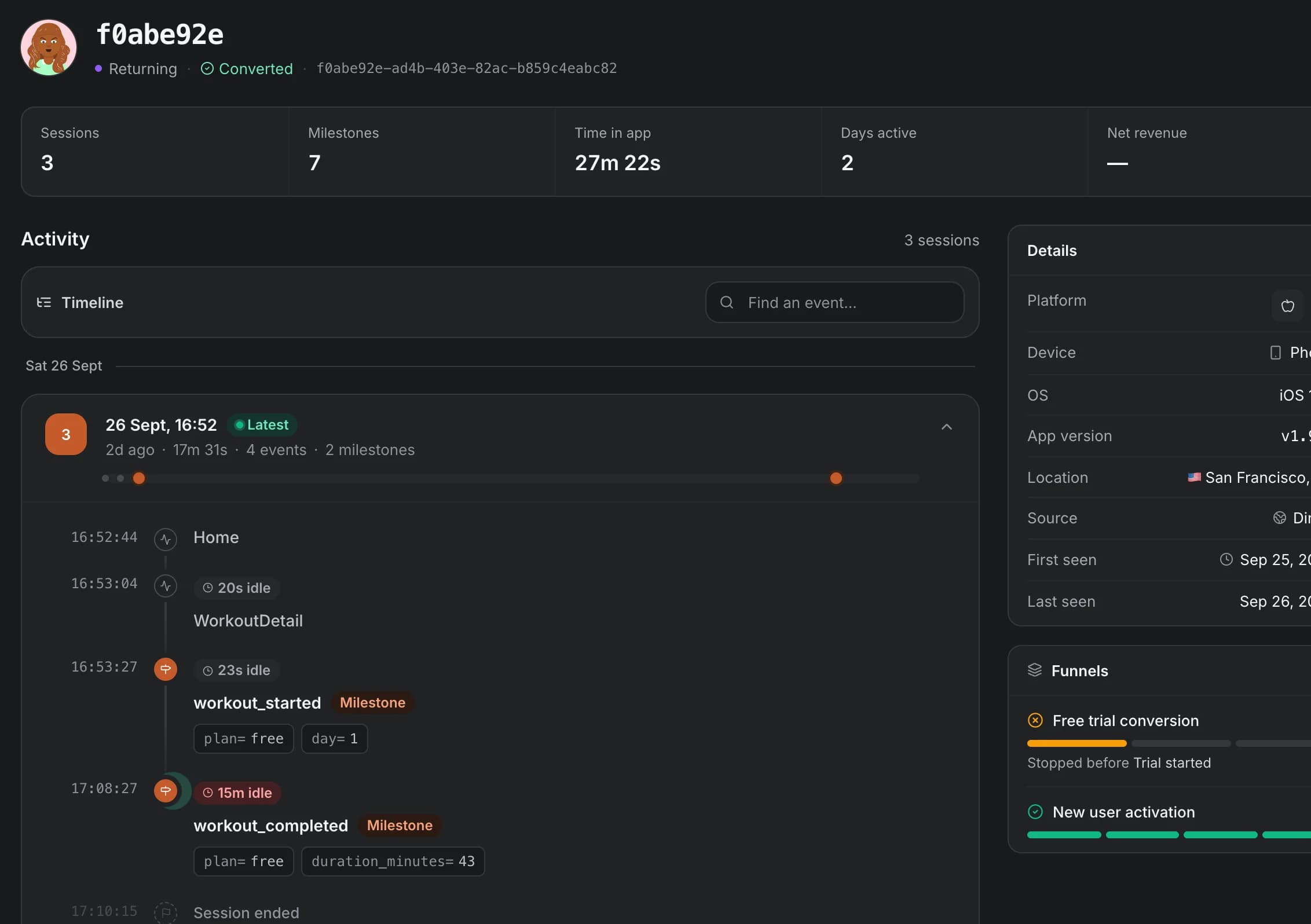
TelemetryDeck anonymizes on the device, which is great for privacy but means you work with aggregates. OnRamp keeps a per-user timeline: every screen, milestone and idle gap in each session, with device, app version and funnel progress alongside. Personal data such as email only appears if you choose to identify signed-in users.
Revenue
App and web revenue together
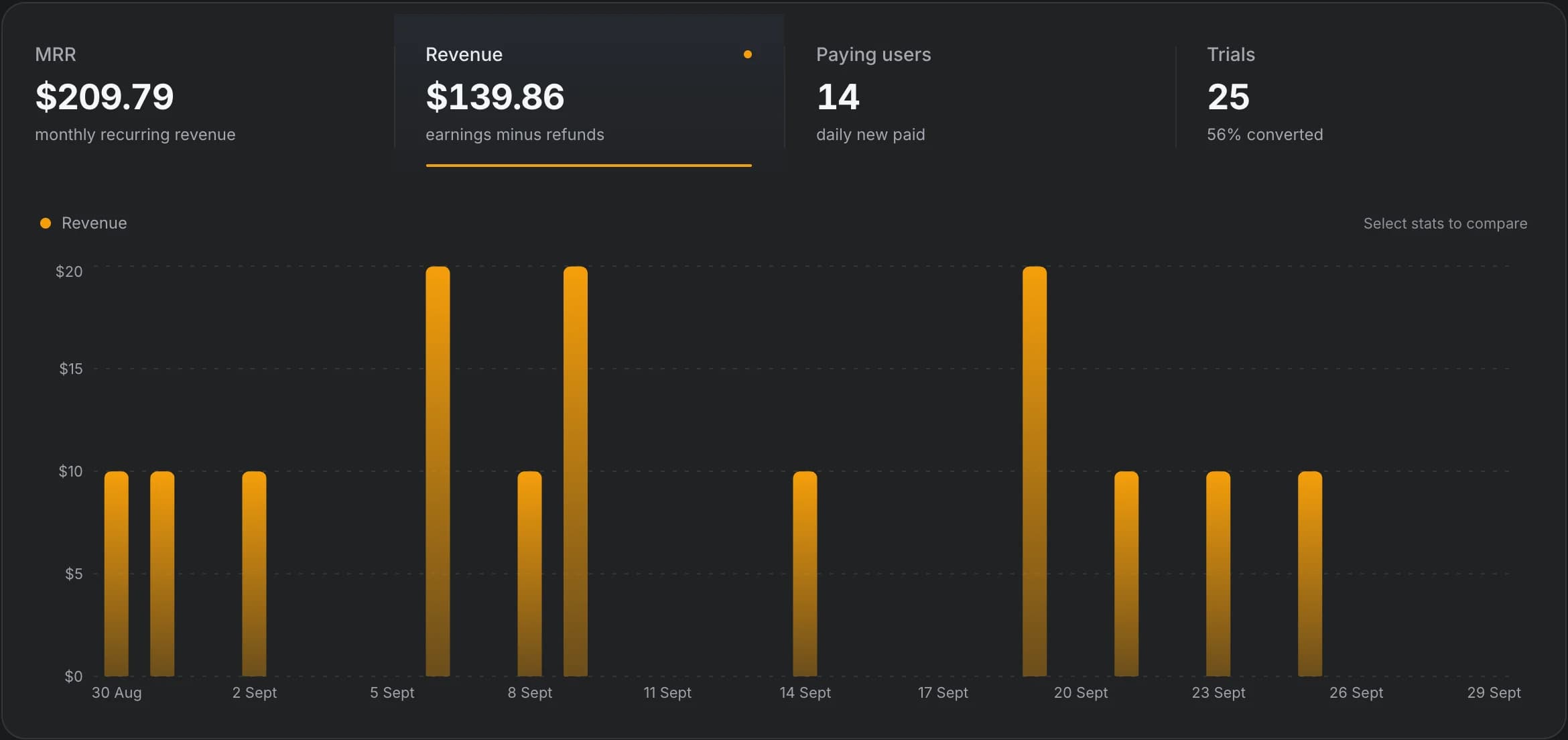
Both tools read RevenueCat. OnRamp also connects Stripe, Paddle and Lemon Squeezy, so if you sell on the web as well, MRR, trials and paying users land in one view.
Setup
Set up by your coding agent, or by hand
OnRamp is agent-first. The setup page gives you one prompt for Claude Code, Cursor or any coding agent. It handles CLI authorization, SDK integration, milestone selection, funnel configuration and verification, then you watch “Waiting for your first event…” turn into “First event received”.
By hand it’s one call per step: OnRamp.init() once, then OnRamp.step('account_created') wherever a milestone happens. The same data is available to agents afterwards through the OnRamp CLI and MCP server.
When TelemetryDeck is the better choice
- You build for Apple platforms beyond iOS, such as macOS or visionOS.
- You want data anonymized on the device before it ever leaves.
- A generous free tier matters more than ad spend or per-user data.
- You don’t run paid acquisition, so ROAS isn’t a question you need answered.
When OnRamp is the better TelemetryDeck alternative
- You pay for installs and need net ROAS per campaign across Apple Search Ads, Google, Meta and TikTok.
- You want funnels that show exactly which users dropped and how long they took.
- You debug onboarding one user at a time with session timelines.
- You sell on the web as well as in the app.
Frequently asked questions
Does TelemetryDeck track ad spend or ROAS?
We couldn’t find ad spend, ROAS or install attribution in TelemetryDeck’s feature list (checked September 2026). It does track purchases and integrates with RevenueCat. OnRamp imports spend from Google Ads, Apple Search Ads, Meta Ads and TikTok Ads.
Which is more private?
TelemetryDeck double-hashes identifiers on the device, so it never receives raw user IDs. OnRamp stores an SDK-generated device ID so it can show per-user journeys, doesn’t store raw IP addresses, and runs in the EU. Pick TelemetryDeck if anonymity is the top requirement, and OnRamp if you need user-level debugging and revenue attribution.
Do both support React Native and Flutter?
Yes. Both have React Native and Flutter SDKs. TelemetryDeck also supports macOS and visionOS. OnRamp supports Expo and native iOS and Android too.
See which channels and steps make you money
Installs, revenue and ad spend on one screen. Let your coding agent set it up, then find the step that loses users.