
The DataFast alternative built for mobile apps
DataFast is a great revenue-first analytics tool for websites. OnRamp brings the same “which channel makes money” answer to mobile apps, with native SDKs, in-app purchase revenue, App Store install attribution and ad spend from four ad platforms.
30-day free trial · No credit card · Checked against DataFast's own site in September 2026
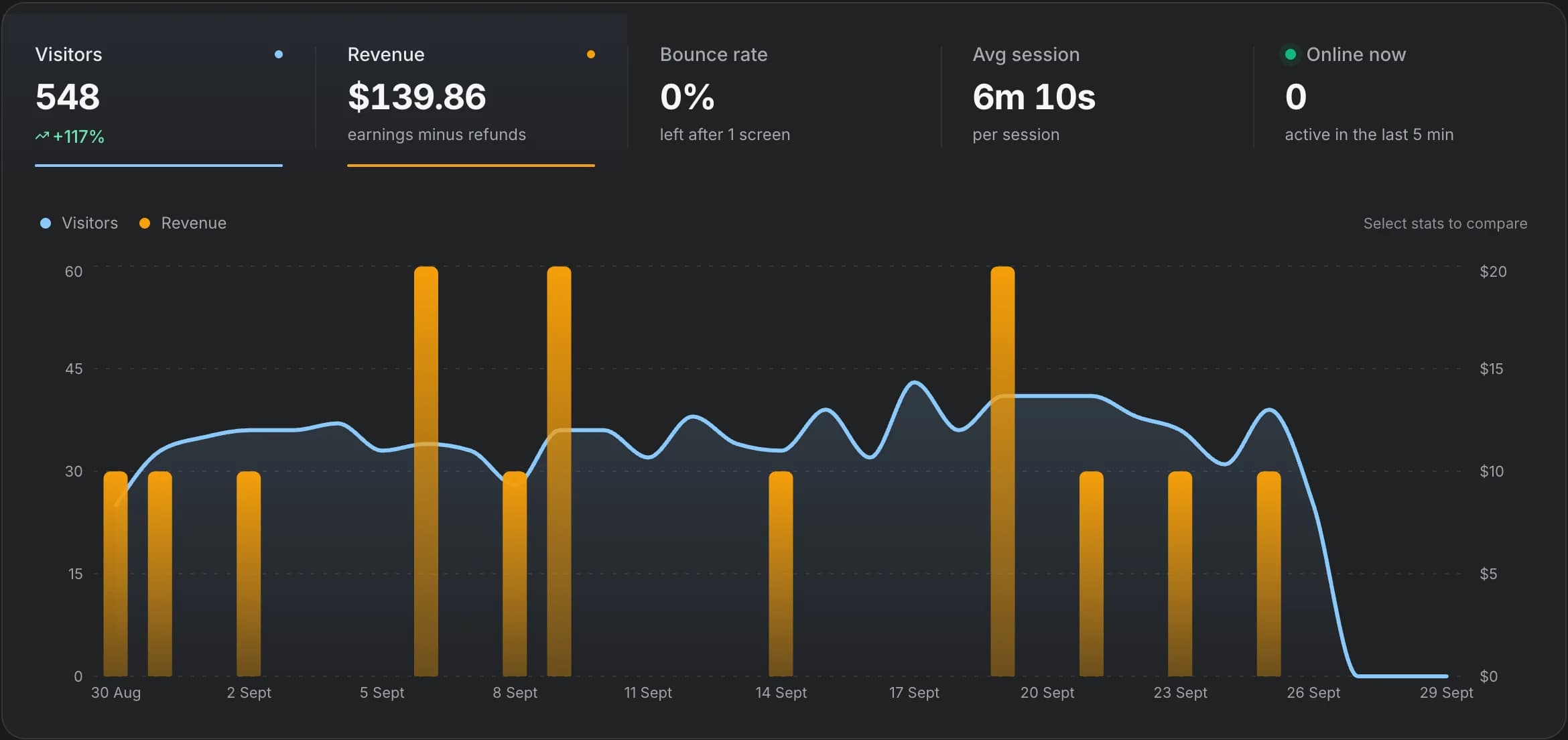
The short answer
Pick the one that fits your product
Choose OnRamp when
Your product is a mobile app (or app plus website), revenue comes through RevenueCat or app subscriptions, and you buy installs on Apple Search Ads, Google, Meta or TikTok. You want ROAS per campaign and to see where new users quit before paying.
Choose DataFast when
Your product is a website or web SaaS paid through Stripe, LemonSqueezy, Polar, Paddle or Shopify, you want a very simple revenue-per-channel dashboard, and multi-year data history matters.
What DataFast does well
DataFast describes itself as revenue-first analytics that shows which marketing channels bring paying customers. It connects web traffic to payments (Stripe, LemonSqueezy, Polar, Paddle, Shopify, WooCommerce and an API), includes goals, funnels and journeys, live visitors, Meta Ads ROAS, and an API, CLI and MCP server. It also offers a React Native/Expo SDK for screens, events and identify.
OnRamp vs DataFast, side by side
DataFast comes out ahead on 1 of these, OnRamp on 6, and the rest are a tie. “Not listed” means we couldn't find it on DataFast's site when we checked in September 2026.
| Feature | OnRamp | DataFast | Edge |
|---|---|---|---|
| Built for | Mobile apps first, plus web | Websites first, plus a React Native/Expo SDK | OnRamp |
| Native SDKs | iOS (Swift), Android (Kotlin), React Native, Expo, Flutter and web | JavaScript and React Native/Expo. Native Swift/Kotlin/Flutter SDKs not listed | OnRamp |
| Revenue sources | Stripe, RevenueCat, Paddle and Lemon Squeezy | Stripe, LemonSqueezy, Polar, Paddle, Shopify, WooCommerce and a payments API | Both |
| In-app purchase revenue (App Store, Google Play) | Yes, via RevenueCat | Not listed in docs | OnRamp |
| Ad spend and ROAS | Google Ads, Apple Search Ads, Meta Ads and TikTok Ads | Meta Ads | OnRamp |
| Install attribution | Apple Search Ads and Google Play install referrer (opt-in) | Not listed; Meta matching uses UTM parameters | OnRamp |
| Funnels | Step drop-off with the users who left, time between steps, and breakdowns by OS, app version, device and property | Goals, funnels and journeys | Both |
| Did the fix work? | Compares app-version cohorts before and after a change | Not listed | OnRamp |
| AI agents | Agent setup prompt, CLI and MCP server | API, CLI and MCP server | Both |
| Data history | 13 months | 3 years (Starter), 5+ years (Growth) | DataFast |
| Price to start | From $10/mo (10k events, 1 app). Scale from $25/mo for unlimited apps and 20 members. 30-day trial, no card | From $9/mo (Starter, 10k events, 1 site). Growth from $19/mo. 14-day trial, no card | Both |
Revenue attribution
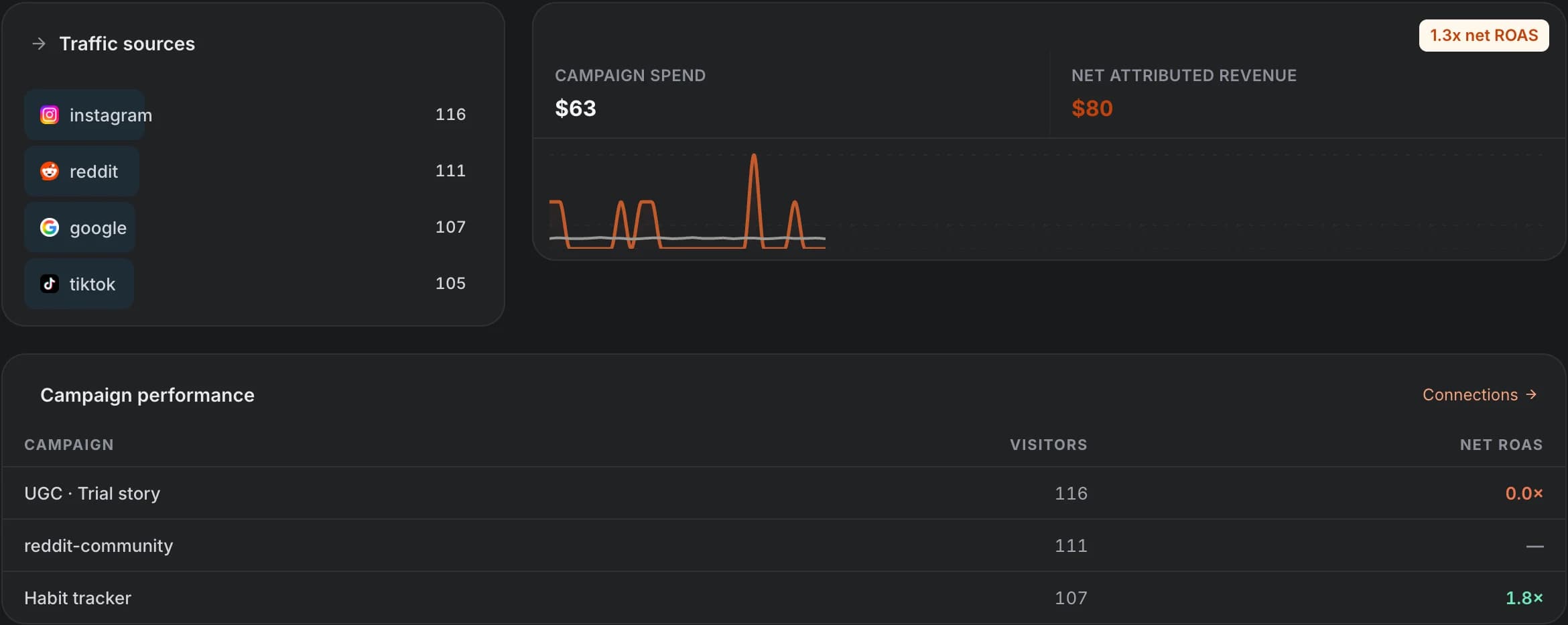
Ad spend and ROAS from four ad platforms, not one
DataFast’s ad integration is Meta: it matches Meta campaigns to revenue using UTM parameters and campaign names. That works well for web checkouts.
Mobile growth usually runs on more than Meta. OnRamp imports daily spend from Google Ads, Apple Search Ads, Meta Ads and TikTok Ads, joins it to the acquisition context already on each visit, and shows net attributed revenue and net ROAS per campaign. Where a platform doesn’t give user-level data, OnRamp says so instead of inventing attribution.
Revenue
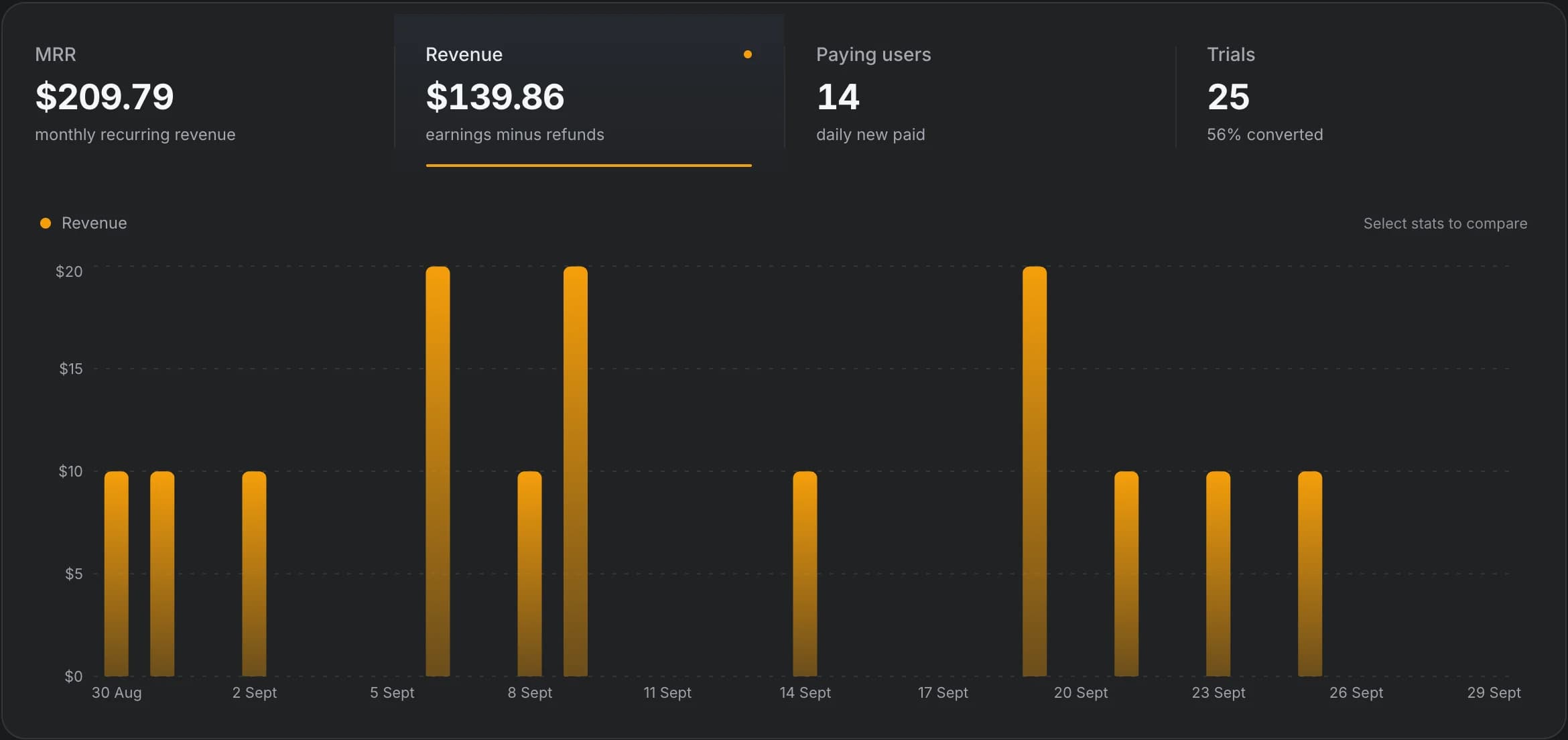
In-app subscriptions count as revenue too
DataFast’s payment integrations are web checkouts: Stripe, LemonSqueezy, Polar, Paddle, Shopify and WooCommerce. We couldn’t find App Store or Google Play purchase tracking in its docs.
OnRamp connects RevenueCat for mobile purchases and subscriptions, and Stripe, Paddle and Lemon Squeezy for web billing. MRR, paying users and trial conversion sit next to the funnel, so you can see which step stops people paying.
Funnels
See who quit, where, and whether your fix worked
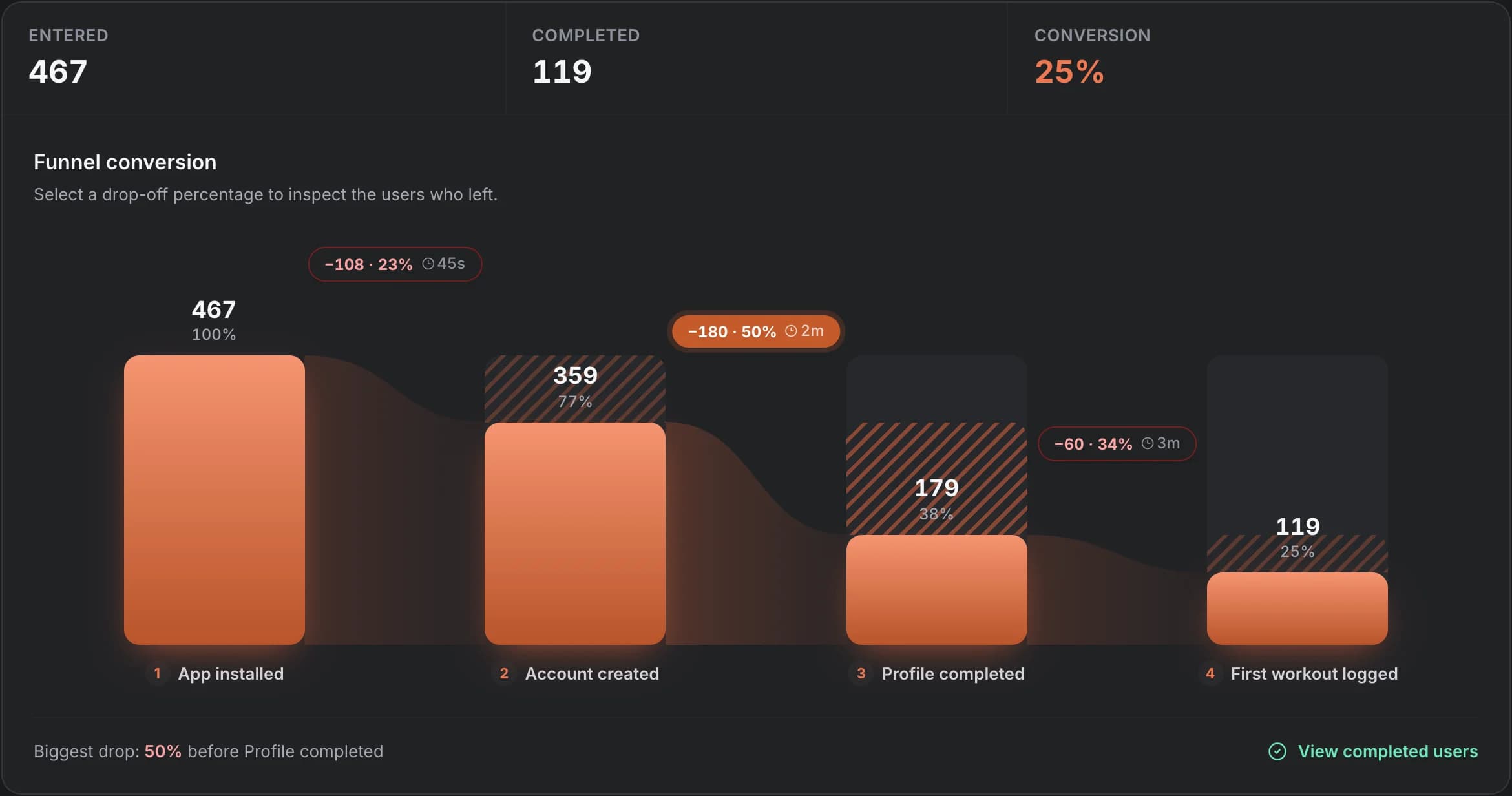
Both tools have funnels. OnRamp’s are built around mobile onboarding: each step shows how many users made it, the hatched zone shows who was lost, and the chip shows how long people took between steps. Click any drop to see the actual users who left.
Break the same funnel down by OS, app version or device to tell a platform bug from a bad step, then compare version cohorts after you ship a fix.
User journeys
Each user’s path, right up to the exit
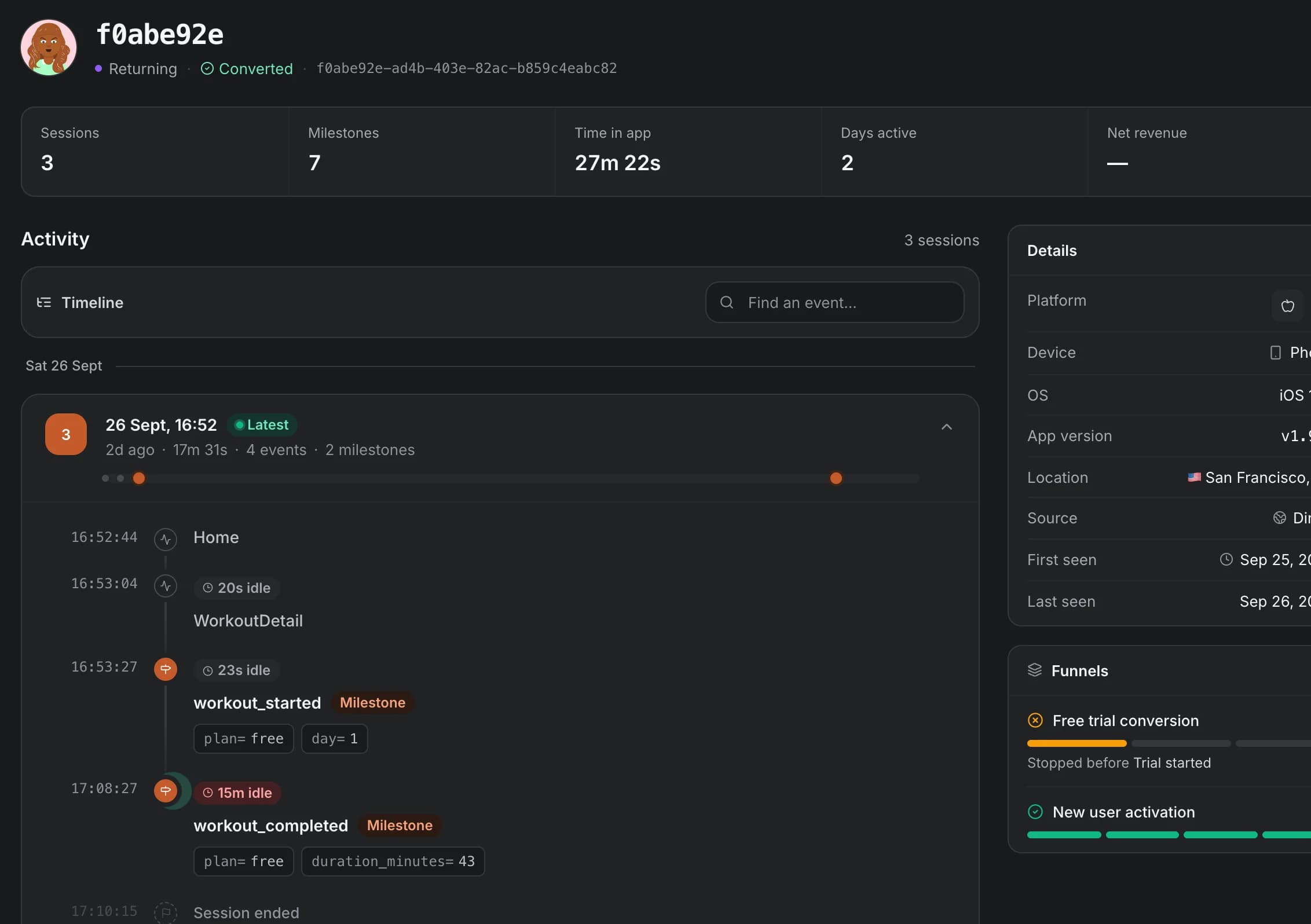
Open any user to see every session as a timeline of screens and milestones, with idle time between them, plus their device, app version, location, acquisition source and funnel progress.
Setup
Set up by your coding agent, or by hand
OnRamp is agent-first. The setup page gives you one prompt for Claude Code, Cursor or any coding agent. It handles CLI authorization, SDK integration, milestone selection, funnel configuration and verification, then you watch “Waiting for your first event…” turn into “First event received”.
By hand it’s one call per step: OnRamp.init() once, then OnRamp.step('account_created') wherever a milestone happens. The same data is available to agents afterwards through the OnRamp CLI and MCP server.
When DataFast is the better choice
- Your product is a website or web SaaS and payments go through Stripe, LemonSqueezy, Polar or Shopify.
- Meta is your only paid channel and UTM-based matching is enough.
- You want several years of history on the entry plan.
- You manage many websites and want up to 30 on one Growth plan.
When OnRamp is the better DataFast alternative
- You ship an iOS, Android, React Native, Expo or Flutter app.
- Revenue comes from in-app subscriptions through RevenueCat, or a mix of app and web billing.
- You buy installs on Apple Search Ads, Google, TikTok or Meta and want net ROAS per campaign.
- You need to find the onboarding step that loses users and prove a release fixed it.
Frequently asked questions
Is OnRamp a good DataFast alternative for mobile apps?
Yes, if your revenue or growth happens in a mobile app. OnRamp has native iOS, Android, React Native, Expo and Flutter SDKs, RevenueCat revenue, Apple Search Ads and Google Play install attribution, and ad spend from Google, Apple Search Ads, Meta and TikTok. DataFast is web-first, with a React Native/Expo SDK for screens and events.
Does DataFast track App Store or RevenueCat revenue?
We couldn’t find App Store, Google Play or RevenueCat revenue in DataFast’s documentation (checked September 2026). Its revenue integrations are web payment providers such as Stripe, LemonSqueezy, Polar, Paddle and Shopify. Check DataFast’s current docs, as this may change.
Which ad platforms does each tool pull spend from?
OnRamp imports daily spend from Google Ads, Apple Search Ads, Meta Ads and TikTok Ads. DataFast documents a Meta Ads integration that attributes revenue and ROAS using UTM parameters.
How does pricing compare?
Both start at around $10/mo for 10k events. DataFast Starter is $9/mo for one website with a 14-day trial. OnRamp Launch is $10/mo for one app with a 30-day trial, and Scale is from $25/mo for unlimited apps. Neither requires a card to try.
See which channels and steps make you money
Installs, revenue and ad spend on one screen. Let your coding agent set it up, then find the step that loses users.